





























A Slice of Vintage CG History by max-
Close
Hover over top left image to zoom.
Click anywhere to exit.
Members remain the original copyright holder in all their materials here at Renderosity. Use of any of their material inconsistent with the terms and conditions set forth is prohibited and is considered an infringement of the copyrights of the respective holders unless specially stated otherwise.
No AI - This artwork was created entirely by hand or with traditional digital tools.
Description
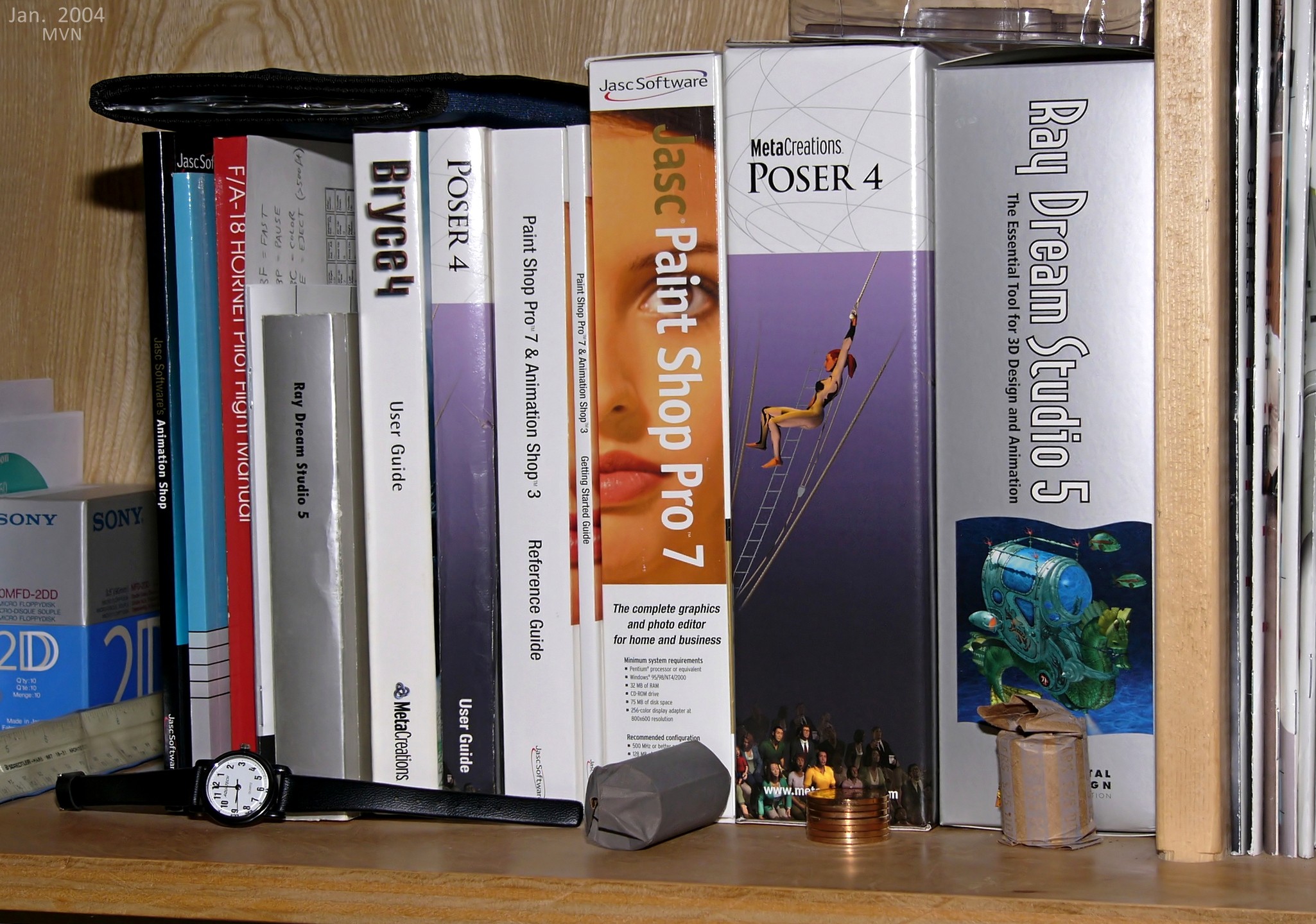
I stumbled upon a fun old photo of my bookcase which instantly brought back nostalgic memories.
I realize this would only have meaning to someone that's lived in the digital art world long enough ;-)
Sadly I have no photos of my very first CG software going back to 1990 which was StrataVision3D and Deneba's Canvas.

Comments (10)
A blast from the past, right down to the box of floppy disks! I remember much of this software, and I may even still have the F/A 18 manual tucked away somewhere.
Hehe, you noticed the F/A 18 Hornet ... lol ... That's actually the only thing on that shelf that goes back to 1990, and it was an Apple Mac game, long before I switched to pc.
I still use Paint Shop Pro & today...lol
Brings back some memories....all those boxes, all that space they consumed...lol...Funny how things change and now you just pay for it, download it and done, no clutter, really helps stop my hoarding :)
Great piece of history you have shared here Max :)
I use PSP now more than I did before ... and it's the original Jasc version, because I disliked the new totally changed Corel version so much that I demanded a refund!
Those were great days you got a book about how to do things in the programs now days you get an PDF file, another point if you just download an program and pay may be 600 dollars for it and the computer goes down you can not in most cases re load
Yup, I remember all those manuals made of real paper!
Looks a lot like my shelf of stuff also. If you throw in Terragen.. I loved Bryce for a long time.
Bryce became my favorite tool ... but now I just occasionally use it to make some clip-art object to feed it to AI ;-)
Make your clip art stuff with AI. Mae what you need, remove the background, and save as PNG. Then assemble in PSP or such.
Ah, true ... sometimes I use that tactic also, but in some cases it's difficult to get an object at just the right angle and perspective.
Well preserved antique books
Keep in mind that photo is 22 yrs old ;-)
I well remember upgrading to Bryce 4 from Bryce 3 all those years ago.
I'm still an avid Bryce user though now I use Bryce 7. It's old but there's no prospect of a newer version now it's owned by Daz. :-(
About 15 years ago I was actively promoting Bryce and pushing for a big update ... but nothing happened, apparently due to some stupid legal licensing nonsense. Then my plans to make tons of Bryce models for sale evaporated, and I walked away and got preoccupied with other life-stuff.
Recently I re-installed Bryce but now I'm very rusty at it ... lol.
I never managed well in Bryce even if I followed some tutos. Now, I play very rarely with it.
At job in 2005, played with the new CS2 Photoshop a lot. Changed of job and didn't see it for years, until it appeared on my way, at home. This "oldie" is still a tool I'm using
oh My! Ray dream studio! Poser 4 and Bryce 4! You needed a copy of photoshop 5 or 6!
Never bought into Photoshop, but I remember when Photoshop 1 came out!
The Good Old Days :-)